Published · By Grim & Goldie Studios
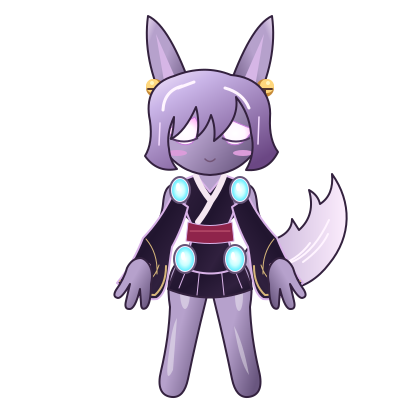
Pick one idea for your character
Before opening every category, choose a direction: a moonlit explorer, a colorful performer, a cozy everyday character or a dramatic fantasy look. This is a design prompt, not a required preset. It helps you decide which options belong together.
Open Avatar Studio and select your character. If this is your first visit, the 2D avatar editor introduction explains the basic workflow. Start with the full-body preview so the face, clothing and accessories are visible together.
Choose a small color palette
Try one main color, one supporting color and a brighter accent. For a moonlit explorer, that might mean dark clothing, cool hair and a gold accessory. For a playful daytime character, you might choose light clothing, a warm hair color and a contrasting small detail.
You are not limited to three colors. The point is to make the most important details easy to see. If the hair, outfit and every extra all compete for attention, simplify one category before adding another.
Work from the face outward
Choose eyes and facial details first, then look for a hairstyle that leaves the features you care about visible. Check how the hair works around your character’s ears, horn or other distinctive features. Use Face framing to inspect the result, and then return to Full body to see how it balances with the outfit.
Next, choose clothing and check its length against the hands and feet. A piece that looks good in a close-up may hide details in the complete character. The Feet framing is useful when shoes, paws or hooves are part of your design.
Add extras deliberately
Choose one strong focal point: wings, a hat, an orbiting effect or another available extra. Some effects share space or are mutually exclusive. When a new choice replaces an existing effect, check the preview and any replacement notice rather than assuming both should remain equipped.
A practical test is to remove the last accessory you added. If the character becomes easier to read, you may already have enough detail. You can always revisit the category later.
Example: build a moonlit explorer
- Choose your character and inspect its default silhouette.
- Select cool-toned hair and eyes that stay visible against it.
- Pick a dark outfit with a lighter detail near the face or hands.
- Add one fantasy extra, then inspect the feet and full-body view.
- Try the look against a different background to see whether its outline remains clear.
This is a sequence of choices, not a promise that every character has identical items. Use the options available in your current editor and follow any access or unlock labels shown there.
Manual choices and random looks serve different purposes
The random dice can help you discover combinations you would not have tried yourself. Manual customization is better when you want to preserve a particular idea and control the details. For discovery XP, a new successfully applied manual option can earn a small first-use reward. Repeated choices, restored looks and random rolls do not generate new manual-choice rewards.
Hold ordinary buttons for three seconds to ask your avatar what they do. The progressive glow shows the hold building. Tap the reminder circle to play Bubble Pop; holding it opens button help.
Give the finished look a place in your day
Use Avatar Glass to see your character outside the full editor. You can interact with it, visit the Room or Travel panels, and take a mini-game break. For a more practical connection, open the Planner and personalize the appearance for the relevant member.
A useful routine is to pair a short character break with a completed task: check off the work you actually finished, then return to your character. The Planner records your inputs; it does not independently verify real-world chores or work. Read how avatars connect with tasks and reminders before setting up your first routine.
Keep a look easy to recognize
Keep one familiar element when experimenting—perhaps a hair color, eye style or signature accessory. Change one other category at a time and review the result. That gives you room to explore while keeping a character identity you recognize.
Try your next look.
Start with a character and make your first manual choices.
Open the 2D avatar editor